
This article explains how to complete the course today easily. You can start and stop as many times as needed. The only section you must complete in one sitting is the final exam.
Turn your audio on and up so you can hear the course read aloud on each page. The 1X button at the top of the page lets you increase or decrease the voiceover speed.


To begin, after you have logged into your course, click on the course name in dark red to move forward or click the Enter button.

There are a few introductory pages. Click the > in the upper right banner to proceed to each page.
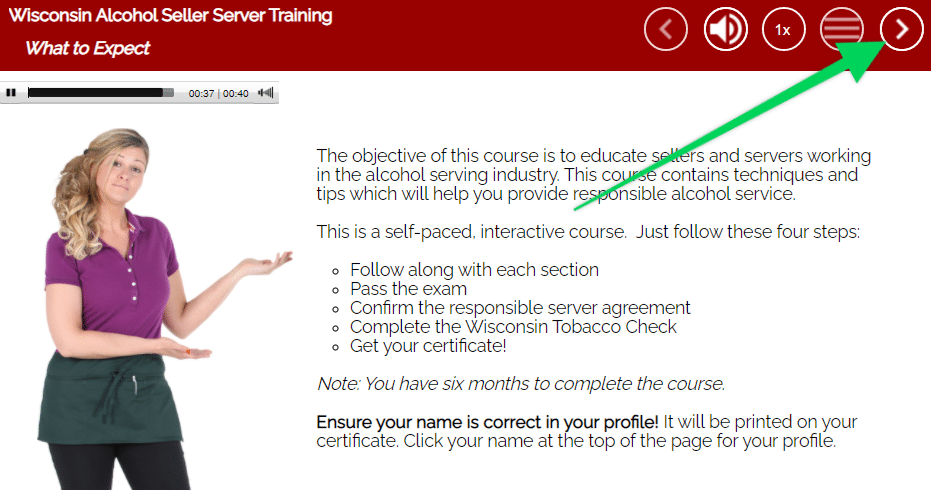
The instruction page—a little more than one minute long — must be watched from beginning to end. It is the only one you must watch and listen to throughout.
You can start and stop as many times as needed. The only section you must complete in one sitting is the final exam.
Follow these steps to return to your course:
- Log in to the course from our homepage at servingalcohol.com
- Click the Sign In button at the top of the page.
- Enter your email address and password.
(If you have a Gmail address, click the Google Login button and enter your Gmail password). - After logging in, click on the course name in dark red.
- On the next page, click on the Enter button.
- Select the Last Visited Page button to return to where you last left the course.
Complete Each Section
From the menu, start at the top of the list. You must complete five sections before you can take the final exam. You’ll begin with the Alcohol Awareness section and work down the list to the State Laws. Each section includes quiz questions. All quiz questions must be answered, or the course will not allow you to take the final exam. Hint: most final exam questions come directly from the quiz questions.
Take The Final Exam Uninterrupted
You must complete the final exam in one sitting. You cannot look back through the course for the answers. You cannot leave the exam for more than 15 minutes between questions. If you look back through the course or pause too long during the exam, you must retake the final exam from the beginning. After the last question, press the red button to process the test results. The next page will show your score. It will also show the answers to the questions you answered incorrectly. You must retake the final exam if you score less than the passing. You can retake the final exam as many times as needed to pass.
*Exceptions: In Michigan and California, you can retake the exam up to three times if needed. If you fail the exam in Pennsylvania, you must retake the entire course from the beginning.
Complete Agreement & Download Your Certificate
After the final exam, move forward. Complete the Agreement section and then download or email the certificate to yourself for FREE as part of the course. After completing the course, you can always return to our website and download it again if needed. From our homepage menu, click Certificate Search under the Resources section. We will store your certificate for as long as it is valid in your state.


